

As of 12 October 2026 Macdio saves a highlight as the second it was marked plus the transcript sentence spoken at that point, and sends it to six places: Apple Notes, Notion, Obsidian, Bear, Craft and Readwise. Marking works with the bookmark button in the player, with Siri, and from the Apple Watch. Highlights sync through iCloud, live in their own list in Podcasts, and can be shared with anyone as text.
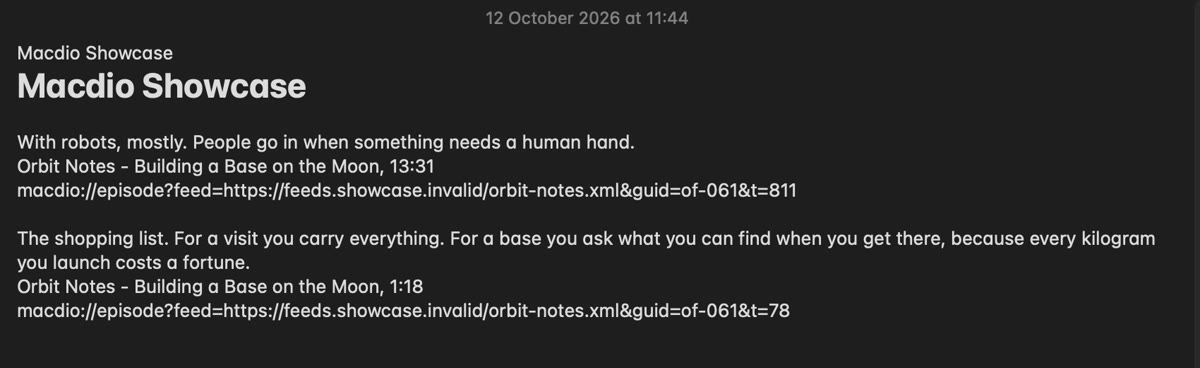
Three ways to mark
The button
The bookmark in the player, on iPhone, iPad and Mac. Press it and keep listening; the mark is saved in the background.
Siri
"Hey Siri, mark this moment in Macdio", from AirPods, the car or the kitchen, when your hands are busy.
The watch
A mark from the Apple Watch while the episode plays there, synced to the phone and the Mac.
Where it goes
- Apple Notes: through a ready-made shortcut you add once on iPhone and iPad, and through AppleScript on the Mac.
- Notion and Readwise: through their APIs with a token you paste once; the token is kept in your Keychain, and iCloud Keychain, when it is on, carries it to your other Apple devices.
- Obsidian, Bear and Craft: through their URL schemes, straight into the app on the same device.
- Anywhere else: Copy or Share puts the sentence, the show, the episode and the time on the clipboard or in the share sheet.
Why the sentence, not only the time
A timestamp alone sends you back to the player to find out what you meant. A highlight in Macdio carries the words that were being spoken, so a note in Obsidian or Readwise reads on its own, months later, without opening the episode. Play from Here is still one tap away when you want the audio.
Macdio next to Snipd and the others
| App | Macdio | Snipd | Apple Podcasts | Pocket Casts |
|---|---|---|---|---|
| Saves the spoken sentence | Yes | Yes | Share a moment | Bookmarks save the words |
| Apple Notes | Yes | Not stated | Not stated | Not stated |
| Obsidian | Yes | Yes | No | Not stated |
| Notion and Readwise | Yes | Yes | No | Not stated |
| Bear and Craft | Yes | Bear | No | Not stated |
| From Siri or a watch | Yes | Not stated | Not stated | Not stated |
| iPad, Mac and Apple TV apps | Yes | No | Yes | Mac and Apple TV |
| Price | 14.99 USD once | Free; Premium 6.99 USD a month | Free | Free with ads; Plus 39.99 USD a year |
Based on each app's own site and US App Store listing, read on 12 October 2026. "Not stated" means the page did not say. Features and prices change; check the App Store for current details.
Common questions
Which notes apps does Macdio send highlights to?
Can I mark a moment with Siri?
Does the highlight include the transcript text?
Where are my Notion and Readwise tokens kept?
Does it work on Apple TV?
Try it
Macdio is on the App Store as a one-time purchase. See how the transcripts that feed the highlights are made, and the comparison with Snipd.