

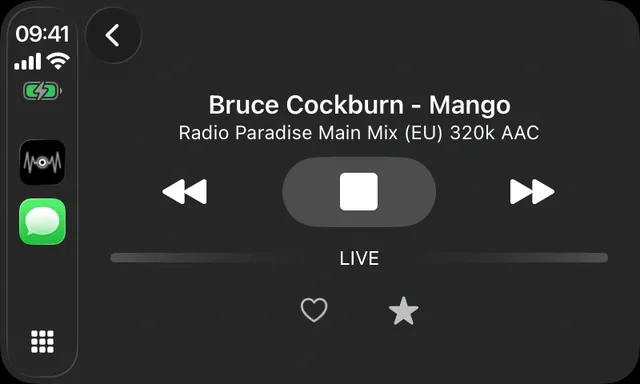
As of 12 October 2026 Macdio supports CarPlay on every car and iPhone that CarPlay itself supports, wired or wireless. The CarPlay app has a Home tab with your recently played stations and a Quick Switch row, a Podcasts tab with Continue Listening and your shows, a Favorites grid with station logos, a Discover tab with Popular Near You and genres, a search one tap away, and a Now Playing screen with the song title, the cover, a Song ID button and Up Next.
Home and Quick Switch
The stations you played last, as a grid of logos, and a row to jump between the ones you switch most. Like the presets on a car radio, without the limit of six.
Podcasts in the car
Continue Listening picks up where the phone left off, and every show you follow lists its episodes. Up Next plays an episode, then a station, then the next episode.
Now Playing that names the song
The song title and artist from the station, the album cover, and a Song ID button for stations that send no titles. Song ID reads the stream, so it never listens to the car.
By voice
Hold the voice button on the wheel and say "Hey Siri, play Radio Paradise on Macdio". Siri answers by voice and the station starts, so a long drive never needs a glance at the screen. The full list of phrases, in 14 languages, is in the Siri guide.
Data on the road
A station at 128 kbps uses about 58 MB an hour; a 320 kbps stream about 144 MB. Podcast episodes you downloaded on Wi-Fi play from the phone and use none. The CarPlay guide has the full table and what to set before a long trip.
When the connection drops
Tunnels and dead zones happen. Macdio reconnects on its own with a short backoff, once per network change, and a safety buffer of up to 15 seconds you set in the app covers short gaps so the music keeps playing through them.
Common questions
Does Macdio work in CarPlay?
Wired or wireless CarPlay?
Can it identify a song while I drive?
Can I play podcasts in the car?
Does it work with Siri?
Is CarPlay part of the price?
Get it
Macdio is on the App Store as a one-time purchase. It appears in CarPlay the next time you plug in or connect.