Internet radio in the car works through CarPlay, using the stations on your iPhone rather than the transmitters within range. Setup takes under a minute, the layout is built for glances rather than reading, and your favorites become presets you can hit without looking.
Setup in three steps
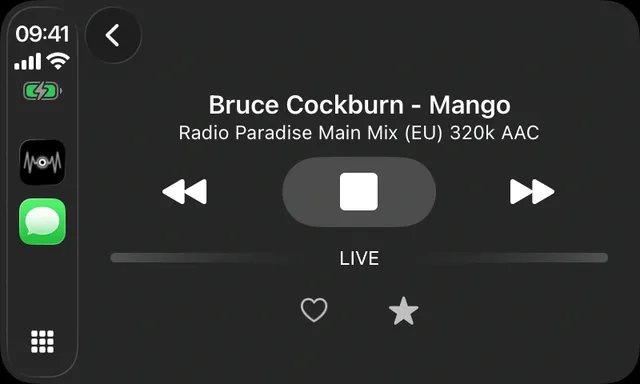
Install Macdio on the iPhone, connect the phone to the car (cable or wireless CarPlay), and the Macdio icon appears on the car screen. Favorites, discovery and Now Playing are laid out for glances, not reading.
Presets, like it used to be
The best car radios had six numbered buttons and zero menus. Macdio's CarPlay screen brings that back: a preset grid of your chosen stations, one tap each, big enough to hit without looking. Behind it sits the full 55,000+ station catalog when a passenger wants to explore. Wondering why the phone cannot simply tune FM instead? See does the iPhone have FM radio.
Long drives, identified songs
Song ID works in the car too, from the stream itself, no microphone listening to your cabin. Heart a song at the wheel and it can land in your Apple Music Favorites automatically, ready at home. More on what song is playing on the radio.
Does CarPlay have a built-in internet radio app?
No. CarPlay shows what your iPhone can supply, so internet radio arrives through an app on the phone rather than through the car. The car's own FM and DAB tuners stay where they are, on the native source list, and CarPlay adds streaming on top of them.
What a long drive costs in data
A 128 kbps station uses roughly 58 MB an hour, so a four hour drive is about 230 MB, and 1 GB covers around seventeen hours of listening. Many stations offer a lower bitrate stream that halves that. It is less than most people expect, and far less than video passengers might be watching on the same plan.
Tunnels, dead spots and wireless CarPlay
Streaming needs coverage, so a tunnel eventually stops the music. Short gaps are covered by the buffer and pass unnoticed, longer ones pause playback until the signal returns. Wireless CarPlay adds a reconnection every time you start the car, and playback picks up again once the phone and the car have found each other.
Frequently asked questions
How much mobile data does it use?
Does wireless CarPlay work?
Does it work with Android Auto?
Can I keep favorite stations as preset buttons?
What happens in a tunnel?
Ready for the road?
Get Macdio on the App Store. One purchase, every Apple device, no subscription.